Question about Squid proxy server:
I've just installed a squid cache server on a linux machine, the hierarchy is like this :
Code:
WAN LINK
|
------------- ---------------------
| Mikrotik Box | | Cache Linux Server |
------------- ----------------------
| /
| /
----------------------
| Switch ( Cheap one ) |
----------------------
| | |
Client1 Client2 Client3 etc.
|
------------- ---------------------
| Mikrotik Box | | Cache Linux Server |
------------- ----------------------
| /
| /
----------------------
| Switch ( Cheap one ) |
----------------------
| | |
Client1 Client2 Client3 etc.
What i'm trying to do is, I want all the traffic regarding to port 80 from Client1,Client2,Client3 to be forwarded to my Cache server at port 8080.
I tried with redirect rule, but it seems it only maps ports on his own and can't redirect somewhere else.
Any idea how to do this?
Thanks
Answer:
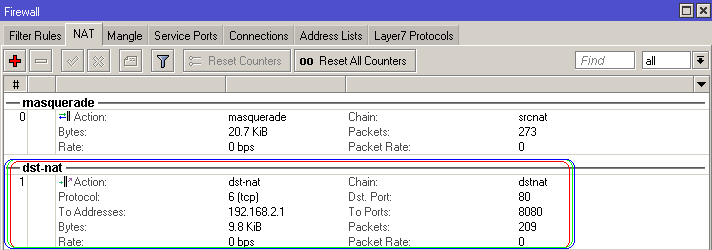
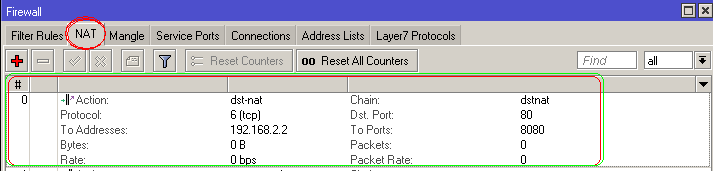
You have to use action=dstnat, as well do not forget to specify to-addresses, where you have to put squid address.
action=redirect is used to redirect traffic to router itself.
action=redirect is used to redirect traffic to router itself.
To do this, if you have squid version 2.6 you have to edit the squid configuration file (squid.conf) putting the following line:
http_port 3128 transparent
instead of
http_port 3128
Of course the command "http_port 3128" is the default squid proxy port configuration.
If you are using Webmin, you have to specify the option "transparent" on:
Servers -> Squid Proxy Server -> Ports and Networking
http_port 3128 transparent
instead of
http_port 3128
Of course the command "http_port 3128" is the default squid proxy port configuration.
If you are using Webmin, you have to specify the option "transparent" on:
Servers -> Squid Proxy Server -> Ports and Networking
I think that the problem could be on the access lists of the proxy server.
What happens should be the following:
1. the hotspot receives your request no the Wireless interface and nat it to the proxy server address and proxy server port (to do it you should have configured the ip firewall nat rules on the Mikrotik);
2. when the hotspot forwards the request to the proxy server, it is forwarded not with the original address, but with the address of the interface which communicates with the proxy as the source address (the WAN address??), and it happens even if you don't enable the webproxy feature on it;
3. then, if you at the moment on the proxy server have an access list which permits just the network configured on the hotspot interface, it could be not enough.
I hope this could help you.
What happens should be the following:
1. the hotspot receives your request no the Wireless interface and nat it to the proxy server address and proxy server port (to do it you should have configured the ip firewall nat rules on the Mikrotik);
2. when the hotspot forwards the request to the proxy server, it is forwarded not with the original address, but with the address of the interface which communicates with the proxy as the source address (the WAN address??), and it happens even if you don't enable the webproxy feature on it;
3. then, if you at the moment on the proxy server have an access list which permits just the network configured on the hotspot interface, it could be not enough.
I hope this could help you.
Another solution:
I am using a similar proxy setup as you are and it is working 100%. Just make sure you have the parent proxy port set up corectly, this stuffed me around initialy, here is my config. Note that this is not my gateway router with the wan's connected but the router behind it.
Hope this helps.
Code:
1 chain=dstnat action=redirect to-ports=8080 protocol=tcp dst-port=80
2 chain=srcnat action=masquerade
2 chain=srcnat action=masquerade
Code:
enabled: yes
src-address: 0.0.0.0
port: 8080
parent-proxy: 10.172.3.2
parent-proxy-port: 800
cache-administrator: ""
max-cache-size: none
cache-on-disk: no
max-client-connections: 1000
max-server-connections: 1000
max-fresh-time: 11h6m
serialize-connections: no
always-from-cache: yes
cache-hit-dscp: 4
cache-drive: system
src-address: 0.0.0.0
port: 8080
parent-proxy: 10.172.3.2
parent-proxy-port: 800
cache-administrator: ""
max-cache-size: none
cache-on-disk: no
max-client-connections: 1000
max-server-connections: 1000
max-fresh-time: 11h6m
serialize-connections: no
always-from-cache: yes
cache-hit-dscp: 4
cache-drive: system
Hope this helps.