Tuesday, January 6, 2009
A nice article on how to configure thunderbird towards gmail

Thursday, December 18, 2008
Download Windows Live 9.0
 Windows Live 9.0 is already available.... Amongst its features are:
Tag Technorati Windows LIve, downloadUser interface has been updated, including the toasts Sign-in screen has been restyled New program/tray icon Updated e-mail icon showing the number of new e-mails more clearly Updated Group window header SkyDrive officially replaces sharing folders feature (Actions > View your online files) Expanded What’s new area shows more details (eg. complete Tweets, added pictures, etc.) and Post a note has been updated for some items What’s new per contact in conversation window You cannot choose your own signature sound any longer. You can only assign signature sounds to your contacts Webcam snapshot has been renamed to Webcam Picture Tile with moods has been renamed to Dynamic Picture Modify moods, videos and/or pictures of previously made Dynamic Pictures Change scene option added to status dropdown list More default Scenes Updated and new static/animated display pictures featuring the Messenger buddy, Morty and Daisy Windows 7 Jumplists Save pictures presented through PhotoShare (Previous photo/Next photo/Save photo) What’s new list options accessible through an icon next to What’s new header, or from a button in Options > Layout
What i'm gonna do today
Just read a book
Friday, December 5, 2008
An example of Mikrotik and Squidproxy configuration
Here are some codes i get from a blog that provides an example of how to configure Mikrotik and Squidproxy. Check it out:
++ MT BOX [ 2.9.27 ]
———————————–
WAN:= 192.168.119.2
LAN1:= 192.168.123.1
WIFI1:= 192.168.124.1
SQUIDBOX:= 192.168.120.2
++ Squid Box [ MINT | SQUID 2.7STABLE5 zph mode on]
——————————————————-
INTERNET - MT - SWITCH — CLIENTS
++++++ |
++++++ SQUIDbox
+redirect http request (port 80/TCP) from 192.168.10.0/24 to proxy 192.168.120.1 port 3128
—————
ip firewall nat
add action=dst-nat chain=dstnat src-address=!192.168.120.0/24 protocol=tcp dst-port=80 action=dst-nat to-addresses=192.168.120.1 to-ports=3128 comment="" disabled=no
SQUID 2.7 stable 5, integrated with zph.
must be transparent mode.
http_port 3128 transparent
compile squid
sudo ./configure –prefix=/usr/share/ –localstatedir=/var –libexecdir=${prefix}/usr/share/squid \
–srcdir=. –sysconfdir=/etc/squid –enable-gnuregex –enable-icmp –enable-delay-pools \
–enable-kill-parent-hack –enable-snmp –enable-cache-digests –enable-carp –enable-async-io=24 –with-aufs-threads=24 \
–with-pthreads –with-aio –with-dl –enable-storeio=coss,ufs,diskd,aufs –enable-removal-policies=heap \
-disable-wccp –enable-default-err-languages=Russian –enable-linux-netfilter –disable-ident-lookups \
–disable-hostname-checks –enable-underscores
make
sudo make install
Monday, December 1, 2008
My first blog using Scribe Fire
Saturday, November 29, 2008
Booting LInux from external HDD on Eee Pc
But occassionaly, sometimes we want a little more. The smallest laptop eg the EeePC has at least 4GB, a capacity that was enough to strip down Linux, eg: Fedora.
But if we do so, it will reduce the hard disk capacity. and that's a little bit irritating. As a tricks, you can install Linux Fedora on an external drive instead, and use your fedora from the HDD. With Linux, that's an easy thing.
If you want to know how to install fedora as usual, you may find it here.
For this tutorial, i use:- Asus Eee Pc 701.
- Fedora 10 on DVD, if you download the ISO, please burn it first on DVD.
- External HDD
- External DVD reader
These are the steps:
- Prepare the Fedora DVD.
- Connect external HDD and external DVD reader to Eee Pc
- Boot from the Fedora 10 DVD.
- Click thorugh the setting until you see
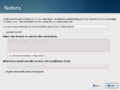
- You should customize the partition table. Your partition setup should look like this:
sda - Eee Pc internal memory
[directory] - [file system] - [size]
/boot - ext3 - 4GB [min 100MB]
sdb - external HDD
[directory] - [file system] - [size]
/ - ext3 - 10GB
/home - ext3 - [allocate as large as you want]
swap - swap - 1GB
- You have to remember to force sda to be the primary partition.
- Continue with the installation
- Okay, everything should be fine.